
How to Change Default App for Click-to-Dial

Change Default App for Click-to-Dial from Skype-for-Business to 8×8

We recently switched over to an 8×8 VoIP business phone system, and we use the 8×8 Virtual Office to make and receive calls on our desktop / laptop. However, when I double-clicked on phone numbers that were highlighted as phone call hyperlinks on various website pages, the old Skype-for-Business app was launched.

Windows 10 Default Apps

So, I went to Windows / Settings / Default Apps / Choose default apps by protocol; and scrolled down to TEL URL:Tel Protocol. It was set to Skype for Business, and I changed it to 8×8 – Virtual Office.
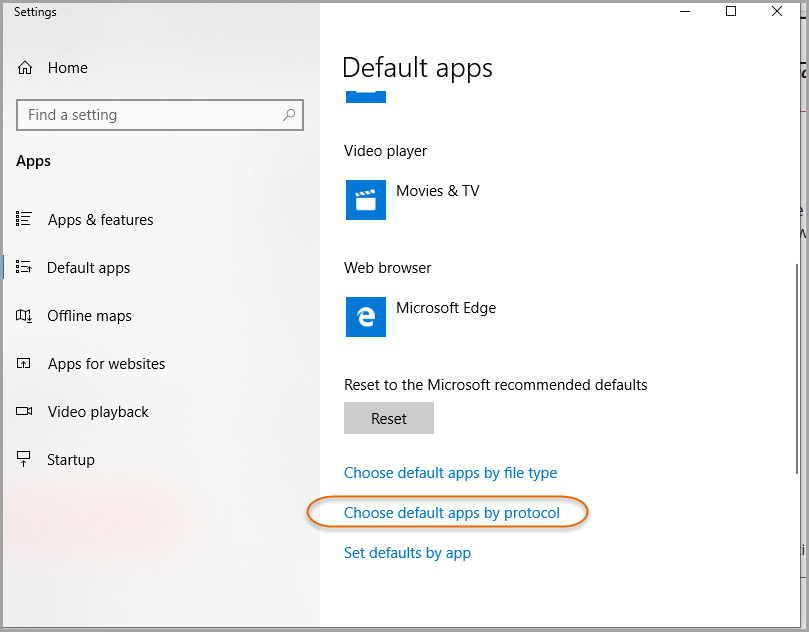
Default App by Protocol

Default Apps by Protocol

Select the 8×8 – Virtual Office, or other phone dialing app, to be able to launch phone calls by clicking on the phone call hyperlinks in a browser.
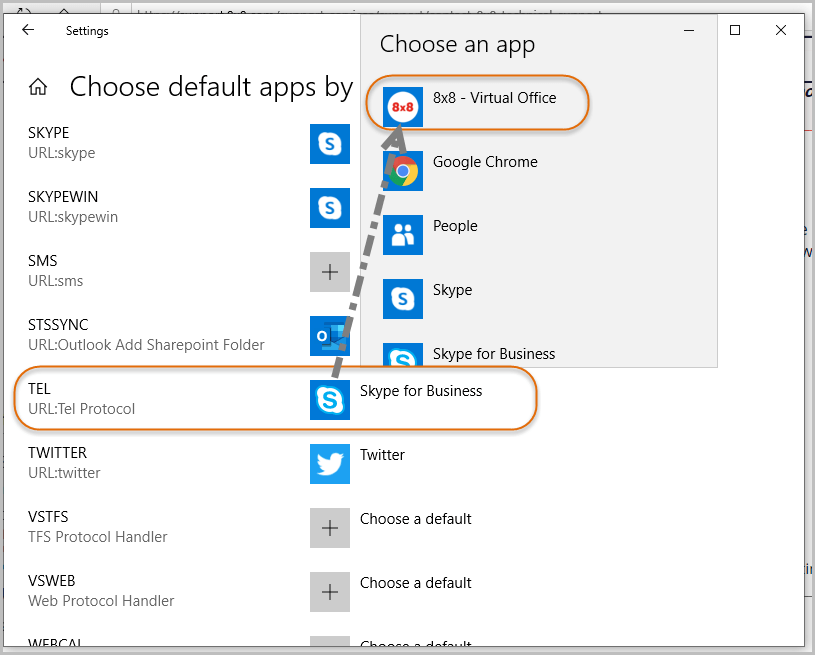
Change Default App for Tel Protocol

Click to Dial

Now when I do click-to-dial on the phone numbers on websites, that are coded with the appropriate type of hyperlink for phone calls, I get my preferred phone-dialing app.
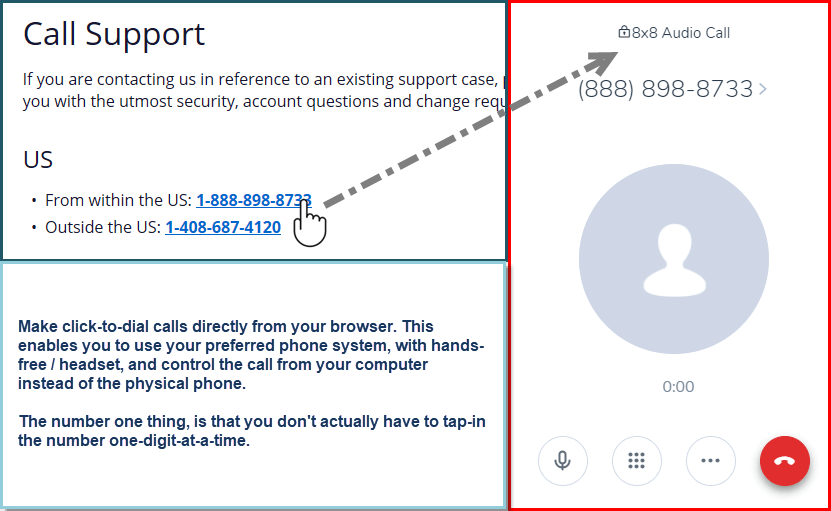
Click to Dial

Stay informed with our latest content

opt-in for occasional emails with latest blog articles, promotions, and webinar invites.

Subscribe Our Blog

This field is hidden when viewing the form

Next Steps: Sync an Email Add-On

To get the most out of your form, we suggest that you sync this form with an email add-on. To learn more about your email add-on options, visit the following page (https://www.gravityforms.com/the-8-best-email-plugins-for-wordpress-in-2020/). Important: Delete this tip before you publish the form.

Download DataStream Checklist of Cybersecurity Requirements for Cyber Insurance gated conent

"*" indicates required fields

Embark on your digital transformation journey with our **Free Small Business IT Assessment** and unlock the potential of cloud technology for enhanced cybersecurity, productivity, and growth.
Stay informed with our latest content:

Contct Us

Schedule a Demo

"*" indicates required fields

Embark on your digital transformation journey with our **Free Small Business IT Assessment** and unlock the potential of cloud technology for enhanced cybersecurity, productivity, and growth.
Opt-in

Schedule a CRM Assessment

"*" indicates required fields

Embark on your digital transformation journey with our **Free Small Business IT Assessment** and unlock the potential of cloud technology for enhanced cybersecurity, productivity, and growth.
Stay informed with our latest content:

Get a Free Quote Today

"*" indicates required fields

Let us know how many licensed Microsoft 365 users you have.
Stay informed with our latest updates:

Microsoft 365 Licensing Consultation

"*" indicates required fields

This field is for validation purposes and should be left unchanged.
We would love to answer any questions you may have on Microsoft 365 licensing. Let us know how we can help.
Stay informed with our latest content:

Download our Microsoft 365 Business Premium * Day 1 * Security Setup Checklist

"*" indicates required fields

Stay informed with our latest content:

Free Small Business IT Assessment

"*" indicates required fields

Embark on your digital transformation journey with our **Free Small Business IT Assessment** and unlock the potential of cloud technology for enhanced cybersecurity, productivity, and growth.
Stay informed with our latest content: