How to Display Default Filter Criteria in SSRS / Fetch-Based Reports in CRM Online

For some reason, the answer to the subject question is not easy to find via Googling.

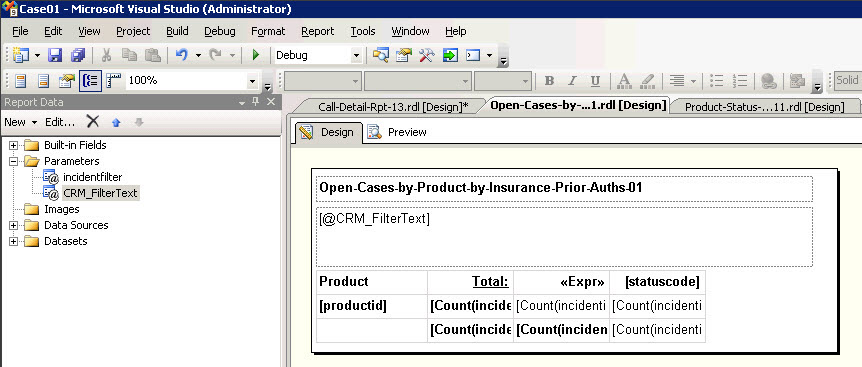
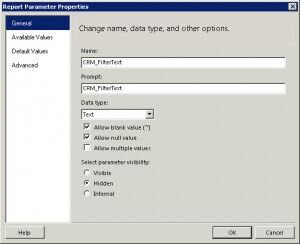
Here’s the answer: Create a new Parameter named CRM_FilterText and add same @CRM_FilterText to a text box at the top of your report.

All set. Stop googling, and get back to report-writing.

Create the CRM Filter Text Parameter
SSRS Design View showing placement of CRM_FilterText Parameter in the heading of the report


Stay informed with our latest content

opt-in for occasional emails with latest blog articles, promotions, and webinar invites.

Subscribe Our Blog

This field is hidden when viewing the form

Next Steps: Sync an Email Add-On

To get the most out of your form, we suggest that you sync this form with an email add-on. To learn more about your email add-on options, visit the following page (https://www.gravityforms.com/the-8-best-email-plugins-for-wordpress-in-2020/). Important: Delete this tip before you publish the form.

Download DataStream Checklist of Cybersecurity Requirements for Cyber Insurance gated conent

"*" indicates required fields

Embark on your digital transformation journey with our **Free Small Business IT Assessment** and unlock the potential of cloud technology for enhanced cybersecurity, productivity, and growth.
Stay informed with our latest content:

Contct Us

Schedule a Demo

"*" indicates required fields

Embark on your digital transformation journey with our **Free Small Business IT Assessment** and unlock the potential of cloud technology for enhanced cybersecurity, productivity, and growth.
Opt-in

Schedule a CRM Assessment

"*" indicates required fields

Embark on your digital transformation journey with our **Free Small Business IT Assessment** and unlock the potential of cloud technology for enhanced cybersecurity, productivity, and growth.
Stay informed with our latest content:

Get a Free Quote Today

"*" indicates required fields

Let us know how many licensed Microsoft 365 users you have.
Stay informed with our latest updates:

Microsoft 365 Licensing Consultation

"*" indicates required fields

This field is for validation purposes and should be left unchanged.
We would love to answer any questions you may have on Microsoft 365 licensing. Let us know how we can help.
Stay informed with our latest content:

Download our Microsoft 365 Business Premium * Day 1 * Security Setup Checklist

"*" indicates required fields

Stay informed with our latest content:

Free Small Business IT Assessment

"*" indicates required fields

Embark on your digital transformation journey with our **Free Small Business IT Assessment** and unlock the potential of cloud technology for enhanced cybersecurity, productivity, and growth.
Stay informed with our latest content: